Codecs.com = Free-Codecs.com
 
    Home  ·  Audio Codecs  ·  Video Codecs  ·  Tools  ·  Codec Packs  ·  Guides  ·  Forum  

 
· VIDEO CODECS
FFDShow MPEG-4
DivX 7.2
Koepi's XviD Codec
DScaler MPEG Filters
DivX Free
OggDS / OGM Codec
Nic's XviD Codec
Ligos Indeo Codec

· AUDIO CODECS
MPEG Layer-3 Codec
AC3 Filter
AC-3 Decompressor
CoreVorbis Decoder
LAME DirectShow Filter
LAME MP3 Encoder
Monkey's Audio
Vorbis Ogg ACM Codec

· CODEC PACKS
XP Codec Pack
K-Lite Codec Pack
Satsuki Decoder Pack
Matroska Pack
Codec Pack All in 1
The Codecs
K-Lite Mega Codec
Cole2k Codec Pack

· TOOLS
Real Alternative
Media Player Classic
GSpot
DVD Audio Ripper
QuickTime Alternative
VLC (VideoLAN Client)
DVDFab
ConvertXtoDVD


K-Lite Codec Pack
Real Alternative
K-Lite Mega Codec
FFDShow MPEG-4
Codec Pack All in 1
QuickTime Alternative
Media Player Classic
XP Codec Pack
LAME MP3 Encoder
AC3 Filter
Storm Codec
ACE Mega CodecS
DivX 7
Vista Codec Package
Nero Burning ROM
Koepi's XviD Codec
VoxWare Audio CoDec
DivX Free
VLC (VideoLAN Client)
Daemon Tools

More Software  

Download movies

AVS Video Converter - a universal AVI to MPEG Converter, AVI to DVD Converter

XP Codec Pack : Download it and enjoy your multimedia experience!


How to (re)install Default Codecs in Windows XP/2000
Last Update: 27 Aug 2004  | Views: 16466
Tell a Friend about this Guide! Tell a Friend about this Guide


1. Choose Start > Control Panel and click Add hardware, then click Next from Add Hardware Wizard.
Click "Yes, I have already connected the hardware" then click Next button, again.

2. Choose Add a new hardware device at the bottom of the list and click Next.
Select "Install the hardware that I manually select from a list (Advanced)", and click Next.

3. Select "Sound, video and game controllers" from "Common hardware types" list and click Next.
Select "(Standard system devices)" from "Manufacturer" and click Have Disk... button.

4. Click Browse in the Install From Disk dialog box and open the folder C:WindowsSystem32
Find mmdriver.inf file, select it and click Open then click OK in the Install From Disk dialog box. If you see a warning about logo compatibility, just click "Continue Anyway".

5. Now you should finally see a list of audio codecs.
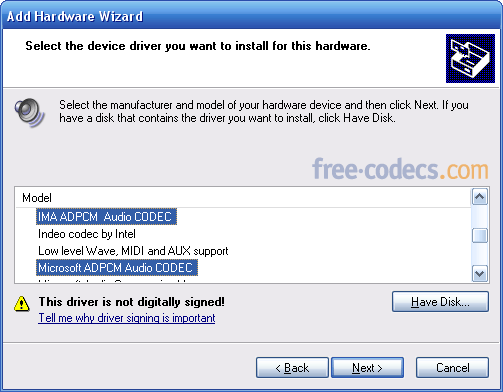


Amongst the other items, you should find Microsoft ADPCM Audio Codec and IMA ADPCM Audio Codec. You need to install them one by one, so select either of these and click Next. This should re-install the codec (take care, you may need your Windows XP CD).

6. Reboot


- All default audio codecs are in the same list with Microsoft ADPCM Audio Codec and IMA ADPCM Audio Codec; just go to step 5 and select them.
- If you want to (re)install video codecs go to step 3, Select "(Standard system devices)" from "Manufacturer" and "Video Codecs" from "Model" then follow the instructions.


The following table lists the codecs included with Windows:
 

Manufacturer Model
DSP Group TrueSpeech Software Audio Codec
Intel Indeo R3.1 Video Codec
Indeo R3.2 Video Codec
Microsoft Audio codecs ADPCM Audio Codec
CCITT G.711 A-Law and u-Law Audio Codec
GSM 6.10 Audio Codec
IMA ADPCM Audio Codec
Microsoft Video codecs RLE Video Codec
Video 1 Video Codec
SuperMatch Cinepak Video Codec


• Related links:
- Adding and Removing Default Codecs (and MCI) in Windows 95/98/Me
- How to install/uninstall DLL and AX codec/filter files
- How to Get the Codecs Downloaded Automatically to Windows Media Player


» AnyDVD & AnyDVD HD
remove the protection of encrypted movie DVDs.
» 20% OFF for DVDFab Platinum/Gold/Mobile
copy DVD to DVDR, iPod, PSP, PS3... Remove all copy protections!
» 10% OFF for 1CLICK DVD COPY
fast and easy-to-use software for copying DVD movies.
» Movavi Video Converter
easily convert from one video format to another...

More Offers  


Download DivX 7


Sitemap :: Privacy Policy :: Disclaimer :: Links :: Link to Us :: Wallpapers :: Trailers :: Special Offers :: Contact :: Advertising
Codecs.com is known also as: Free-Codecs.com : CodecsDownload.com
All website graphics, design, logo and layout are Copyright © 2004-2010 Codecs.com
Yep