How to fix Class not registered or 80040154 error
3.69
from 51 Reviews
"Class not registered" is one of the most annoying and frustrating error message I ever got because none of the video files can be played by Windows Media Player, Media Player Classic or other DirectShow player and common fix methods (Windows Media Player reinstallation/upgrade, codec reinstallation...) seems to fail.
Fortunately, the solution (in fact one of them because there are few different solutions) for this problem is very simple.
After some research I found that quartz.dll (a DirectX related DLL) wasn't registered correctly.
How to register it?
Click on Start > Run... > and type regsvr32 quartz.dll
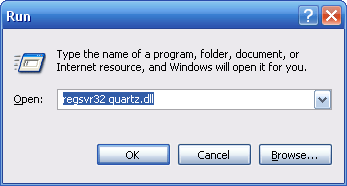
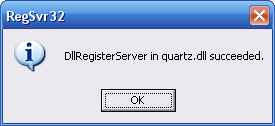
In the end, you should receive a message saying that your file was succesfully installed.
Note: Please, let us know if the solution suggested here wasn't helpful for you so we can try to complete this guide with other hints.
Reviews & Comments
worked on a windows xp professional.
i found class not registered in attendance management software. I format and installed a new software but again same problem is detected what can I do plz help me
Windows 10 error message:
"The module "quartz.dll" was loaded but the call to DllRegisterServer failed with error code 0x80070005.
For more information about this problem, search online using the error code as a search term."
"The module "quartz.dll" was loaded but the call to DllRegisterServer failed with error code 0x80070005.
For more information about this problem, search online using the error code as a search term."


